Laying the foundations with file organization
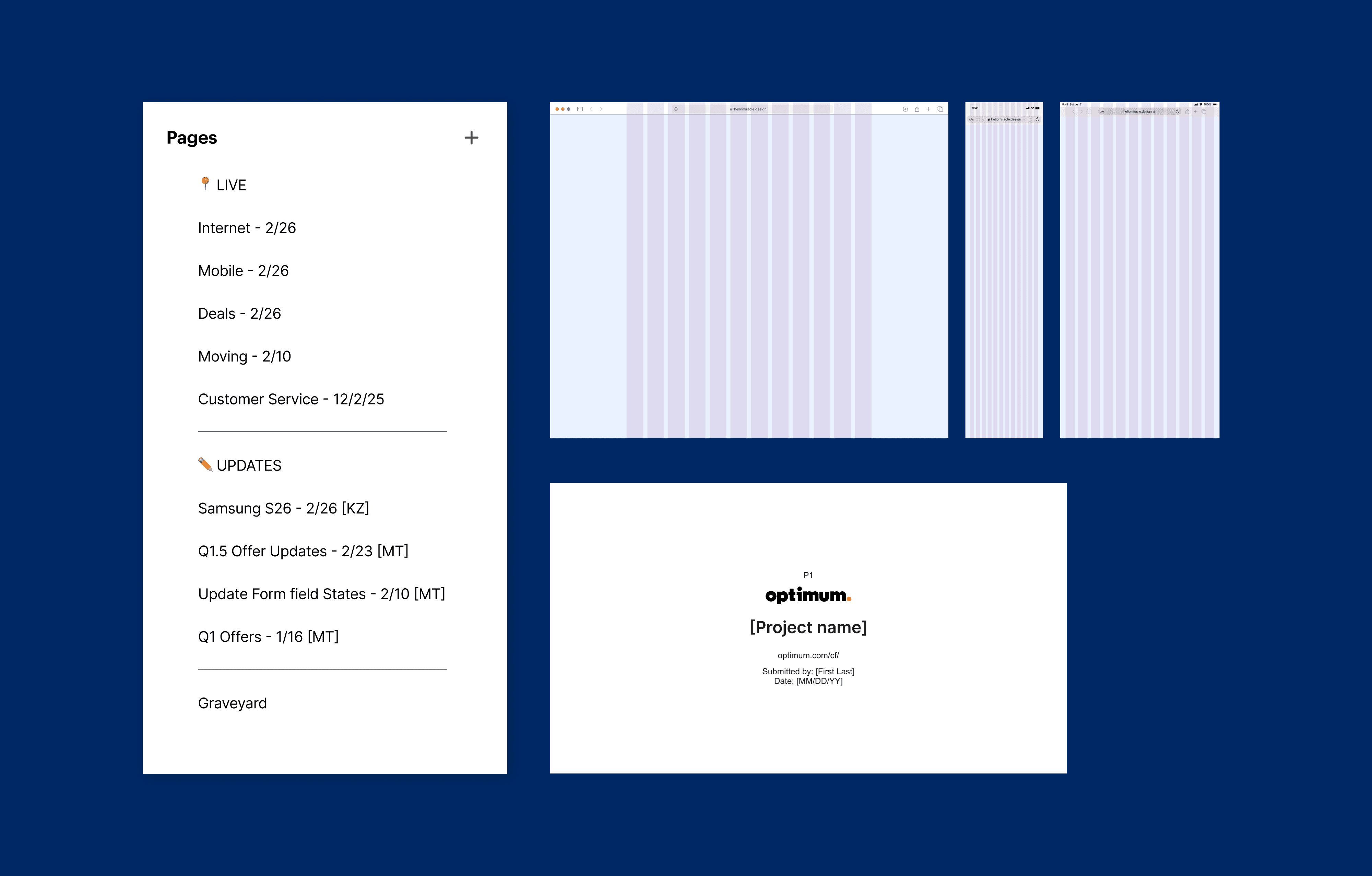
The primary functions of a production designer at Centerfield are 1. update advertised offers, legal, and messaging on landing pages per client or internal request and 2. maintain Figma file organization and accuracy against live sites.
My time at Centerfield began with migrating the organization's Adobe XD screens over to Figma. This mainly consisted of importing, auditing, and rebuilding but gave me the opportunity to set the standard for file structure.
Key elements include:
-> Project files organized by domain + year rather than individual tests or tickets
-> 'LIVE' pages section reflecting the current landing pages in production labeled with the date last modified
-> Pages for individual update or test tickets dated, initialed, and sorted by date. Larger brands would have a dedicated file for tests
-> Desktop, tablet, and mobile mocks of every page across a site rebuilt with auto-layout for easy editing
MVP Design libraries
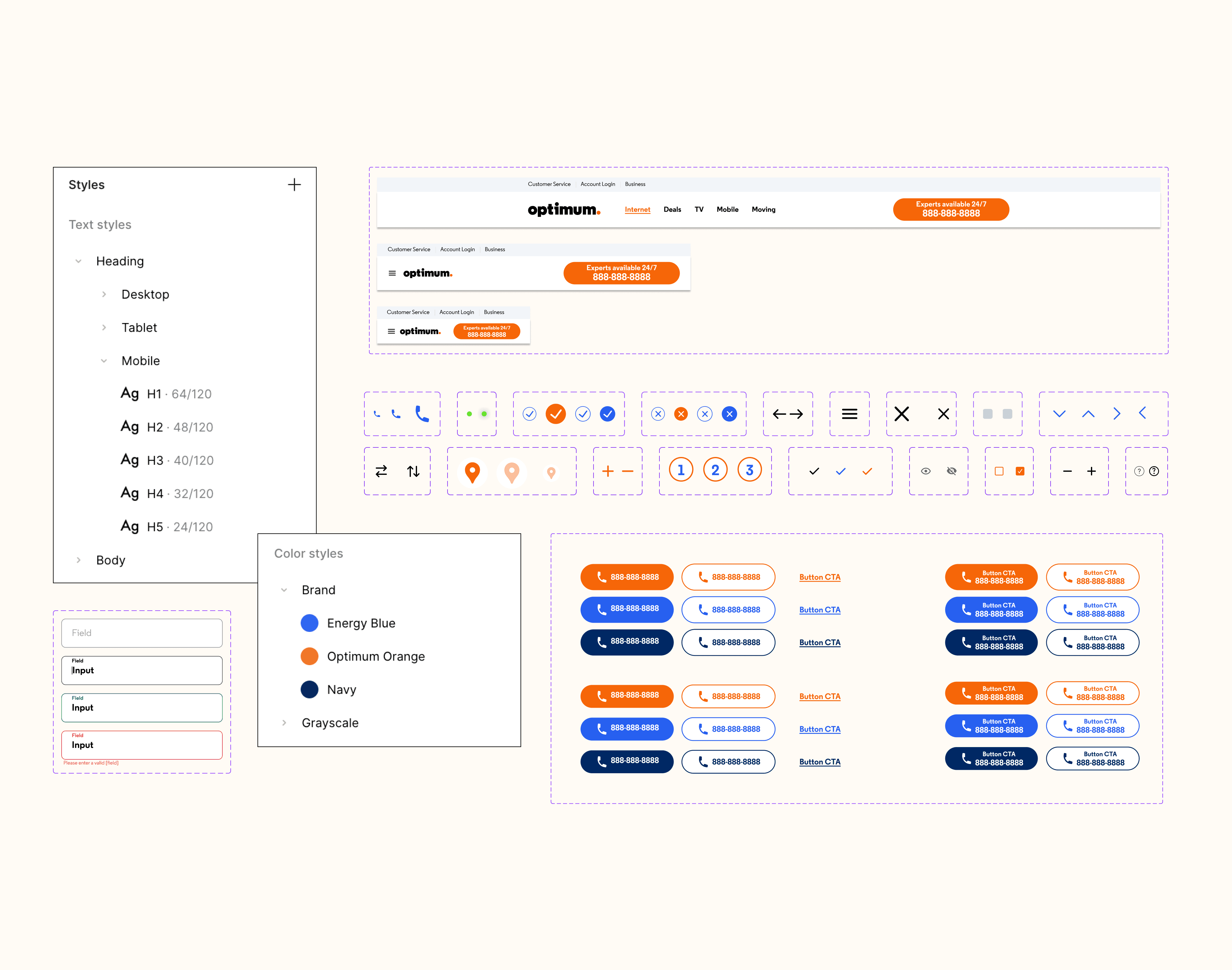
As new file organization freed up time usually spent on update tickets, our production team of 2 was able to focus on additional time-saving processes such as design systems, that as of early 2024, were non-existent at Centerfield.
Speed was still paramount so we focused on an MVP of all design libraries needing the following foundational elements: typography, color, navigation, buttons, and icons.
At this stage all styling was done within Figma's "styles" panels and scaling was done manually or via component variants. There was only bandwidth for minimal optimization at this time with the goal being to import designs and assets as they were just so designers could have the foundations ready for consistent designs.
Adapting to client needs and introducing variables
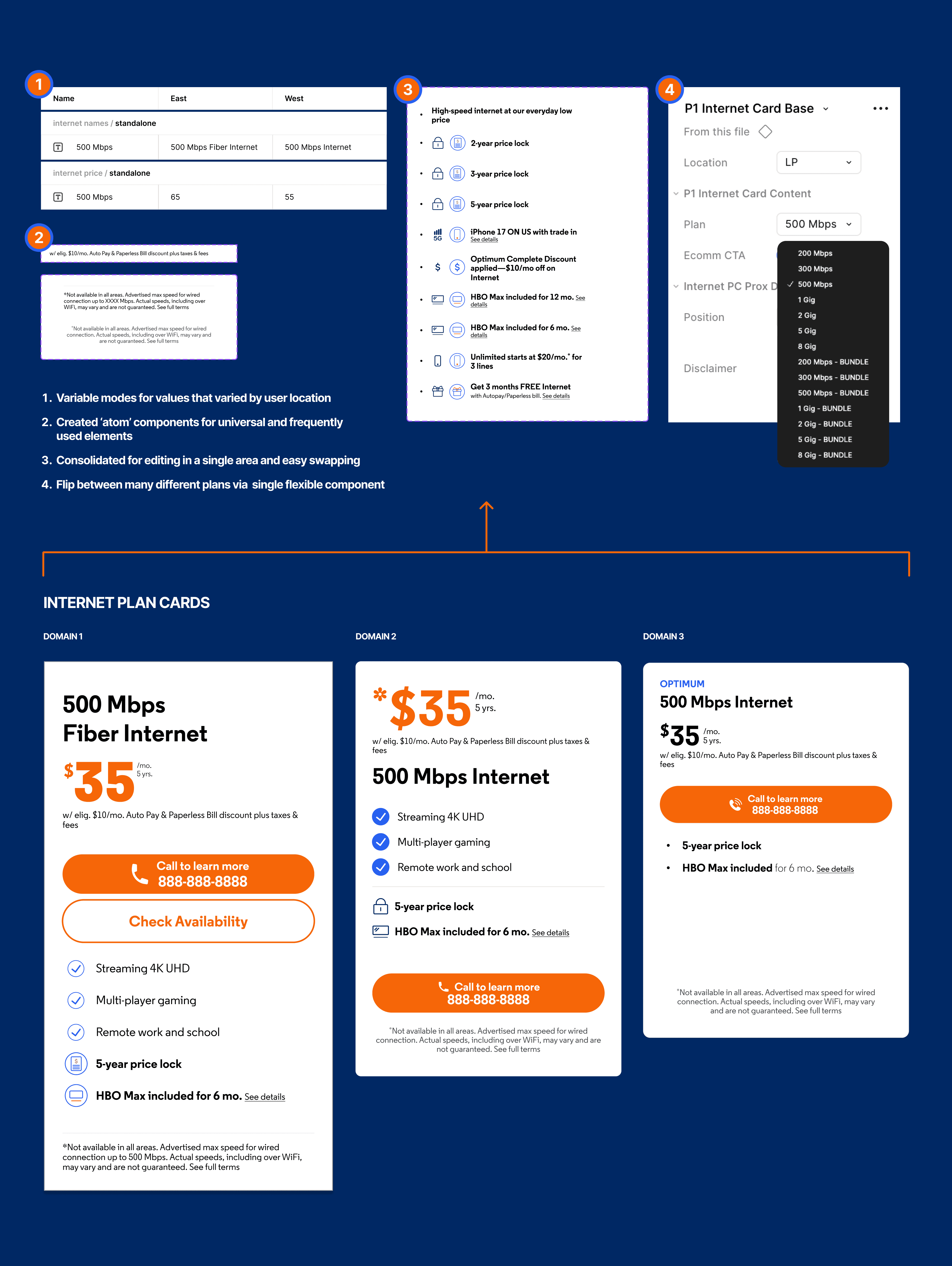
While the basics were enough for brands with fewer screens and irregular updates, higher-impact brands would benefit significantly from additional connectivity. Optimum for example, had 3 domains to maintain consisting of a total of at least 11 unique landing pages, not including hyper-contextualized variants or leadflow pages. To manually find and update revisions across so many pages creates a greater margin for error.
Additions to larger brands included:
-> Moving long-form legal from designs to individual documents for better changelog visibility and sharing
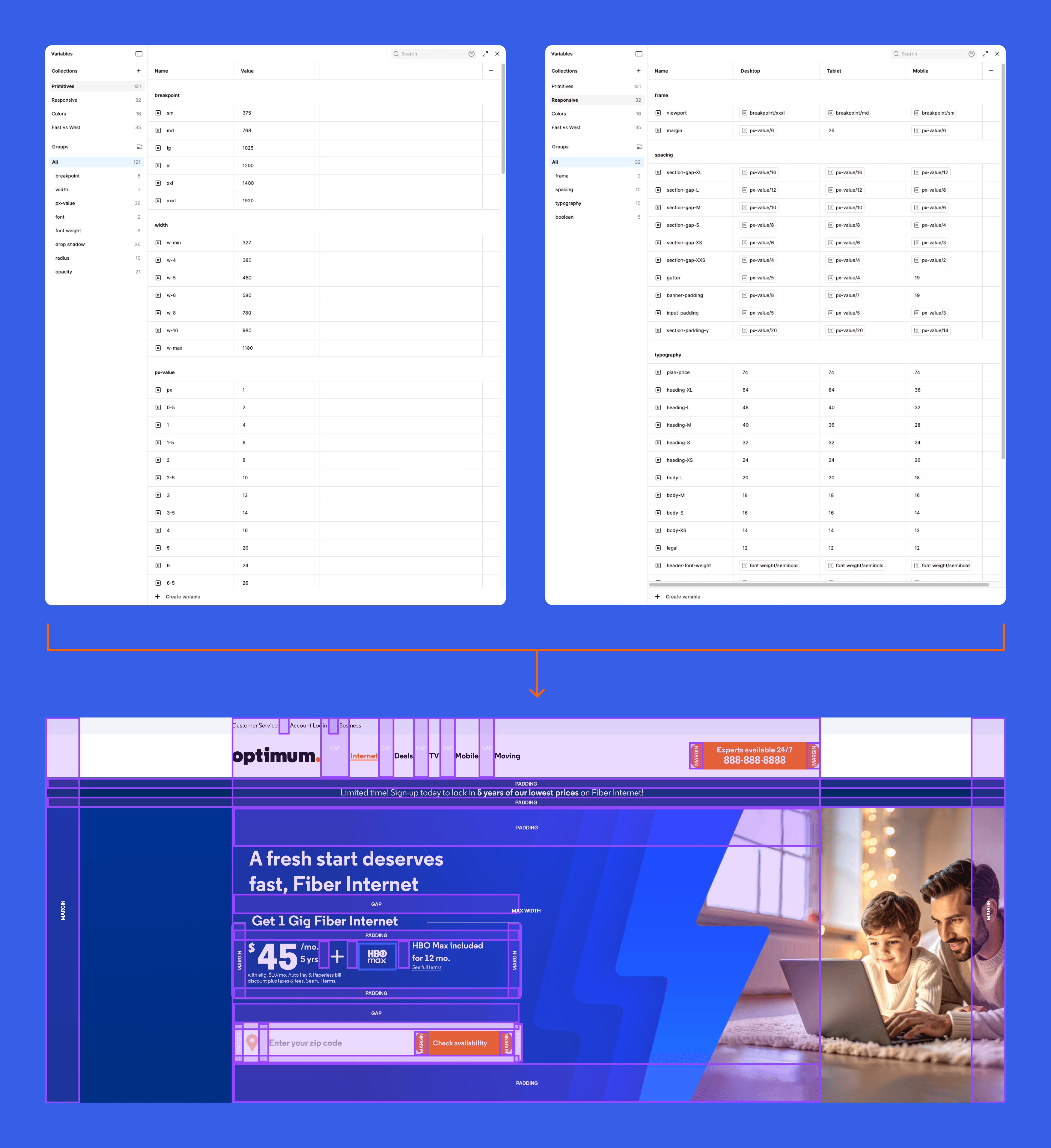
-> Using Desktop, Tablet, and Mobile variable modes for faster scaling
-> Iterating on plan card components (a high priority and high risk of error area) until landing on a version that is flexible, lightweight, and easy to use
-> Ramped up annotation use for communication between designers and usage notes
Cross-functional alignment and faster development with AI
The most recent improvement to design operations had been further alignment with adjacent teams on recurring pain points. These updates increased the speed and accuracy with which each team could perform their duties.
-> Introduced Primitives variable collection and aligned naming conventions with dev needs for Figma MCP compatibility
-> Retroactively creating components for every page section and connecting every fixed property back to a variable to improve AI output
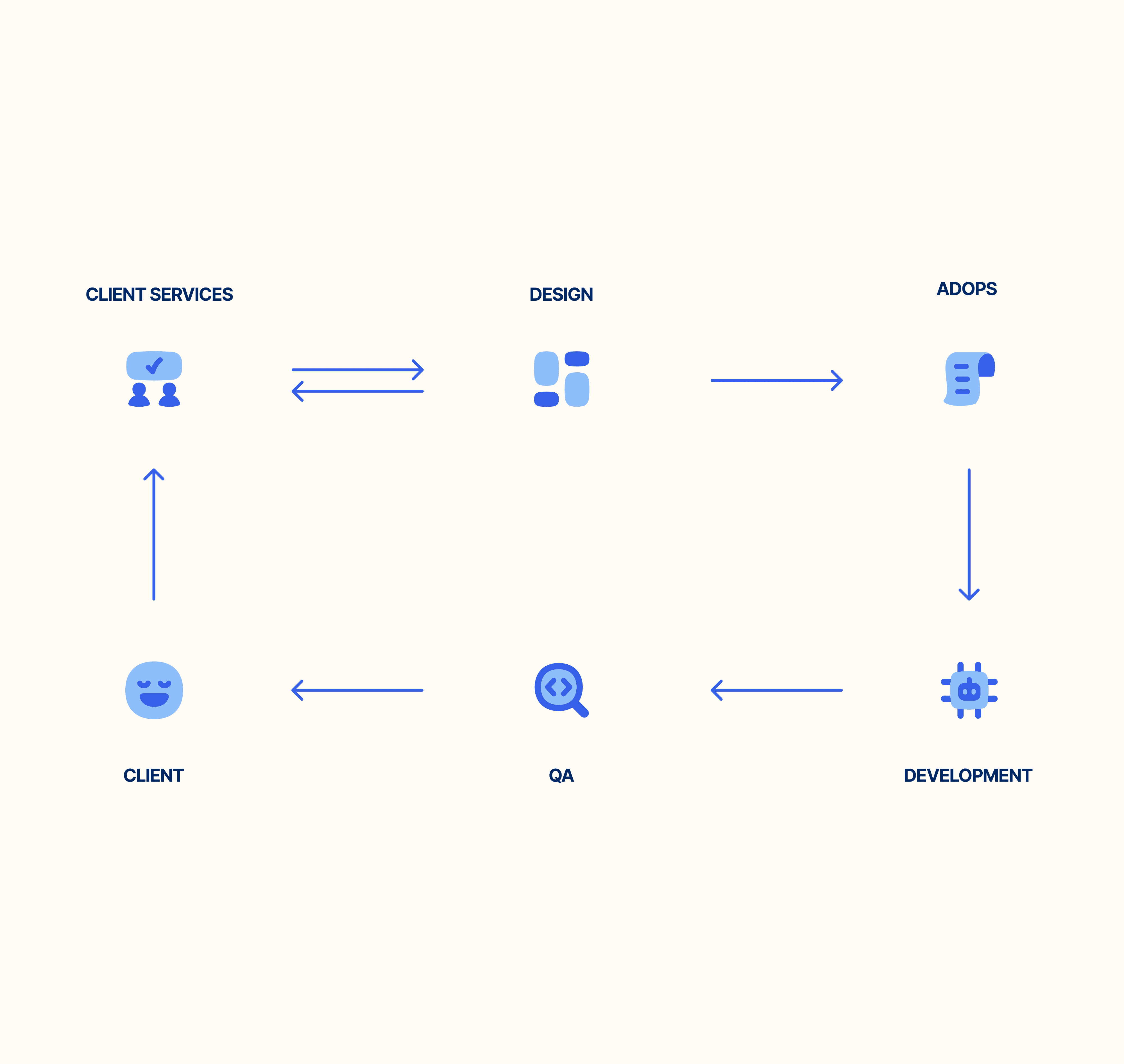
-> Aligning with AdOps and Media Buyers to uncover all site variation statuses and align naming conventions
Impact: More time on the details that matter, less on the back and forth
Design systems and file organization with increased automation and alignment cross-functionally resulted in fewer errors, less back and forth with client and/or dev, and as a result, faster turnaround times.
✓ Reduced troubleshooting
✓ Improved collaboration
✓ Increase client satisfaction
Given its success this process was also carried out across all other partnering brands in varying degrees with adaptations suited for each unique brand.
~40%
REDUCED DESIGN TIME
ON UPDATES
70%
DEV IMPROVED
VELOCITY TO RELEASE
0 -> 220
TOKENS
BUILT

Optimum serves approximately 4.6 million customers across 21 states with Internet, TV, Phone and Mobile services. As part of their paid search marketing efforts Centerfield manages 3 domains consisting of at least 11 unique landing pages.
Contributions
Team
Laying the foundations with file organization
The primary functions of a production designer at Centerfield are 1. update advertised offers, legal, and messaging on landing pages per client or internal request and 2. maintain Figma file organization and accuracy against live sites.
My time at Centerfield began with migrating the organization's Adobe XD screens over to Figma. This mainly consisted of importing, auditing, and rebuilding but gave me the opportunity to set the standard for file structure.
Key elements include:
-> Project files organized by domain + year rather than individual tests or tickets
-> 'LIVE' pages section reflecting the current landing pages in production labeled with the date last modified
-> Pages for individual update or test tickets dated, initialed, and sorted by date. Larger brands would have a dedicated file for tests
-> Desktop, tablet, and mobile mocks of every page across a site rebuilt with auto-layout for easy editing
MVP Design libraries
As new file organization freed up time usually spent on update tickets, our production team of 2 was able to focus on additional time-saving processes such as design systems, that as of early 2024, were non-existent at Centerfield.
Speed was still paramount so we focused on an MVP of all design libraries needing the following foundational elements: typography, color, navigation, buttons, and icons.
At this stage all styling was done within Figma's "styles" panels and scaling was done manually or via component variants. There was only bandwidth for minimal optimization at this time with the goal being to import designs and assets as they were just so designers could have the foundations ready for consistent designs.
Adapting to client needs and introducing variables
While the basics were enough for brands with fewer screens and irregular updates, higher-impact brands would benefit significantly from additional connectivity. Optimum for example, had 3 domains to maintain consisting of a total of at least 11 unique landing pages, not including hyper-contextualized variants or leadflow pages. To manually find and update revisions across so many pages creates a greater margin for error.
Additions to larger brands included:
-> Moving long-form legal from designs to individual documents for better changelog visibility and sharing
-> Using Desktop, Tablet, and Mobile variable modes for faster scaling
-> Iterating on plan card components (a high priority and high risk of error area) until landing on a version that is flexible, lightweight, and easy to use
-> Ramped up annotation use for communication between designers and usage notes
Cross-functional alignment and faster development with AI
The most recent improvement to design operations had been further alignment with adjacent teams on recurring pain points. These updates increased the speed and accuracy with which each team could perform their duties.
-> Introduced 'Primitives' variable collection and aligned naming conventions with dev needs for Figma MCP compatibility
-> Retroactively creating components for every page section and connecting every fixed property back to a variable to improve AI output
-> Aligning with AdOps and Media Buyers to uncover all site variation statuses and align naming conventions
Impact: More time on the details that matter, less on the back and forth
Impact: More time on the details that matter, less on the back and forth
Design systems and file organization with increased automation and alignment cross-functionally resulted in fewer errors, less back and forth with client and/or dev, and as a result, faster turnaround times.
✓ Reduced troubleshooting
✓ Improved collaboration
✓ Increase client satisfaction
Given its success this process was also carried out across all other partnering brands in varying degrees with adaptations suited for each unique brand.
~40%
REDUCED DESIGN TIME
ON UPDATES
70%
DEV IMPROVED
VELOCITY TO RELEASE
0 -> 220
TOKENS
BUILT